

Staring at &&var&i or &&¶m in production SAS code often looks like punctuation soup. But the SAS Macro Processor is not guessing—it evaluates ampersands with 100% mathematical determinism. The key is understanding that in the Macro World, everything is unquoted plain text. Macro evaluation executes strictly in pre-compilation passes using three mechanical rules: (1) Scan left-to-right, (2) Collapse every pair of double ampersands (&&) into a single literal ampersand (&), and (3) Recursively rescan until no ampersands remain. Once you master this scanning rhythm, building dynamic multi-table loops, clinical macro arrays, and self-generating pipelines becomes second nature.
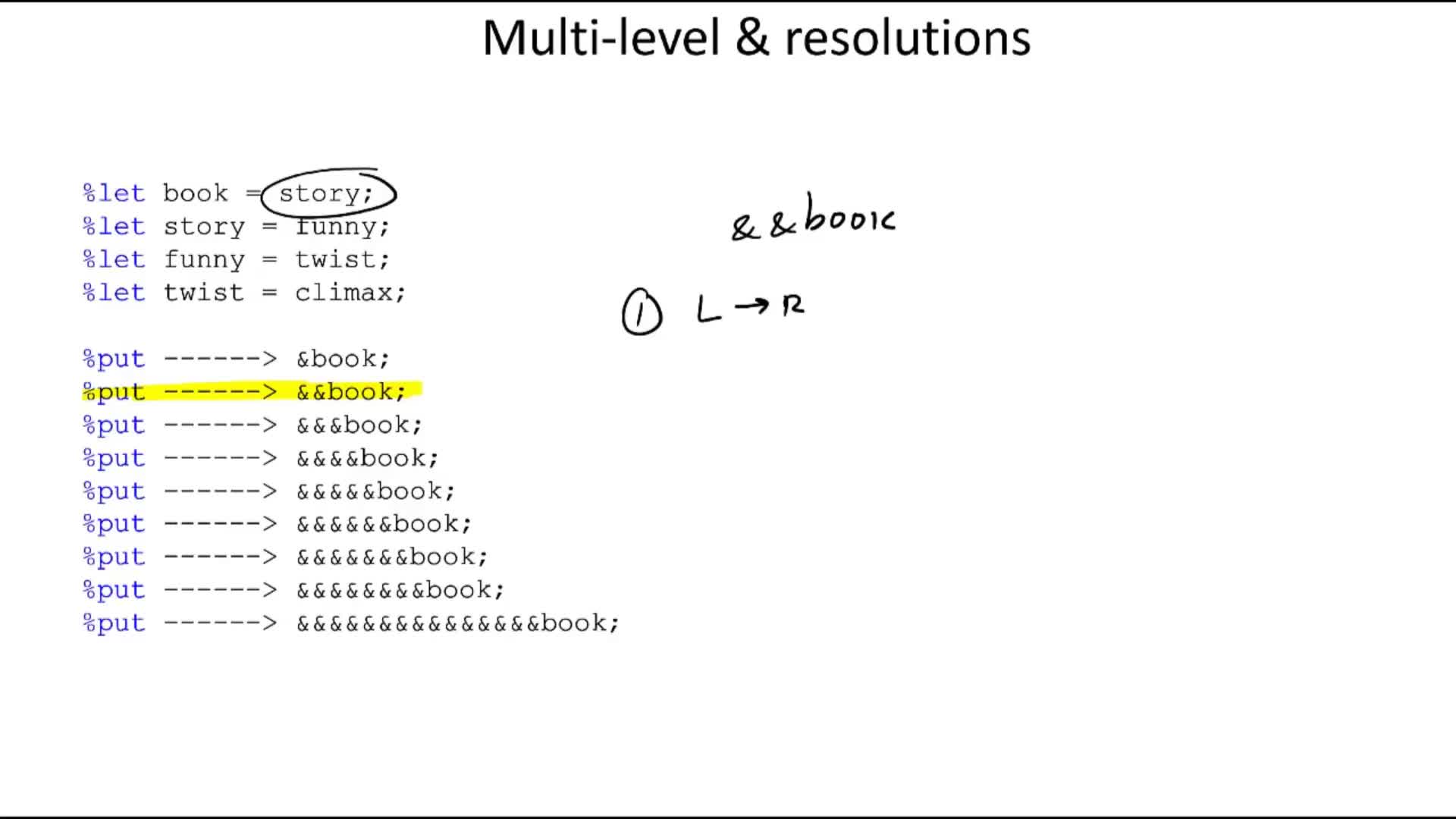
The Two Realities of SAS: Data World vs. Macro World #
To master nested macros, you must first separate SAS into its two distinct operating realms:
-
The Data World: This is where
DATAsteps andPROCsteps execute. In the Data World, variables have strict numeric or character datatypes, memory is allocated via the Program Data Vector (PDV), and code is compiled into binary instructions before processing observations one by one. -
The Macro World: This is a pre-compilation text-generation factory. The Macro Processor does not know what a dataset, a row, or a floating-point number is. To the Macro Processor, everything is plain text strings. If you write
%let x = 3 + 5;, the value of&xis not the number 8; it is literally the five-character text string"3 + 5".
When you reference a macro variable with an ampersand (&var), the Macro Processor intercepts the code before the compiler ever sees it, fetches the text from the symbol table, and substitutes the characters directly into your code stream. When macro variables contain the names of other macro variables, we enter the realm of indirect referencing.
The Three Inflexible Rules of Ampersand Resolution #
Whenever the SAS word scanner encounters consecutive ampersands, it adheres to three mechanical rules without exception:
&& → &):
Every pair of consecutive ampersands collapses into exactly one literal ampersand in the output stream for that pass. It does not evaluate the variable name behind it yet.
The Classroom "Funny Book" Trace #
In our Made2Stick SAS classroom videos, we use a 4-tier chain of macro variables to prove that no matter how complex the nesting looks, the machine never makes a mistake:
/* 4-Tier Nested Definitions */
%let book  = story;
%let story = funny;
%let funny = twist;
%let twist = climax;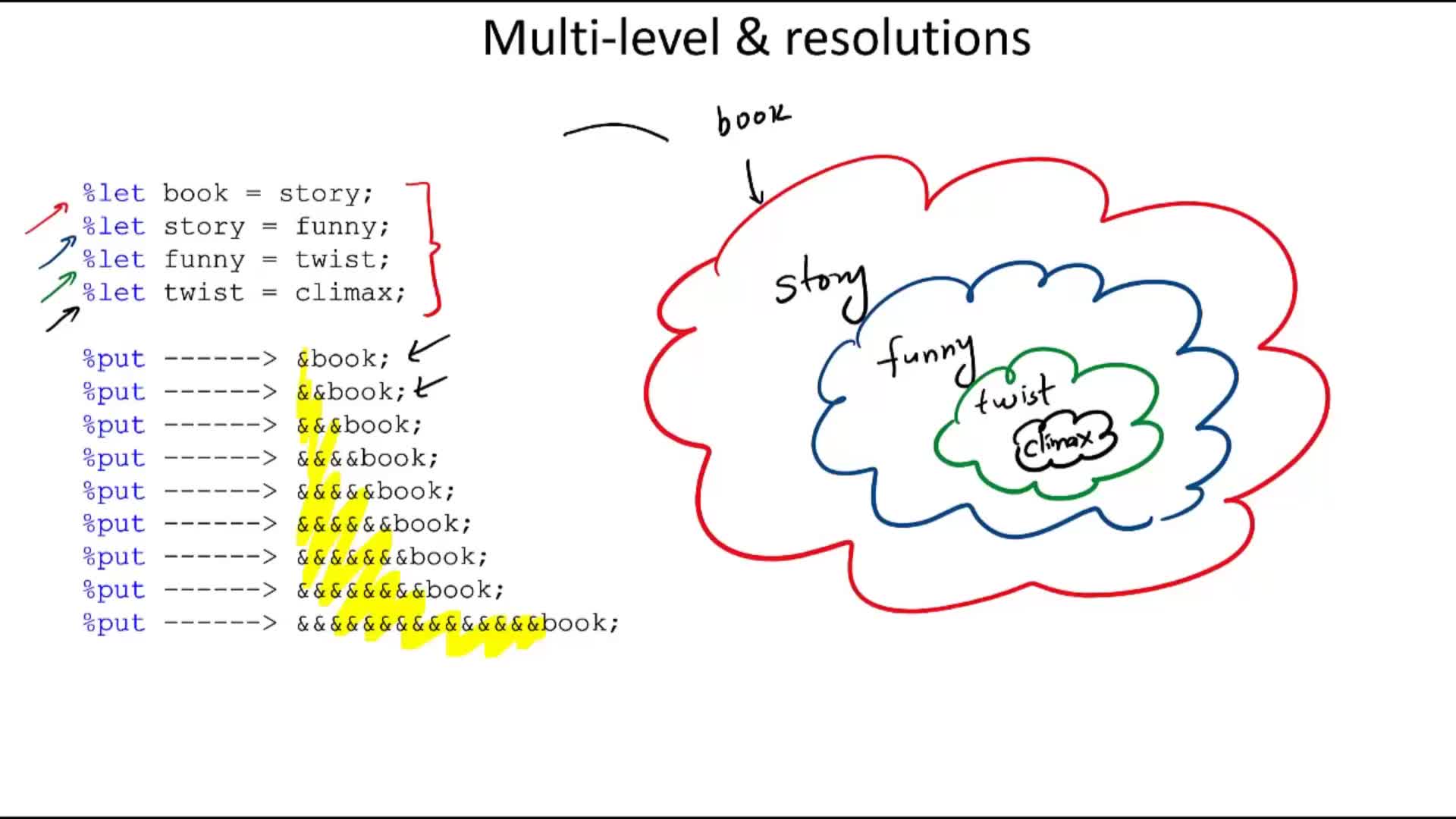
Let's trace what happens when we increase the number of ampersands:
The Extreme Test: 15 Ampersands #
What happens if you write 15 consecutive ampersands: %put &&&&&&&&&&&&&&&book;?
- Pass 1: The 15 ampersands break down into 7 consecutive pairs (
&&) plus one trailing single ampersand before the wordbook. The 7 pairs collapse into 7 single ampersands. The trailing&bookresolves tostory. Output token:&&&&&&&story. - Pass 2: 7 ampersands break down into 3 pairs (3
&) plus&story(which resolves tofunny). Output token:&&&funny. - Pass 3: 3 ampersands break down into 1 pair (1
&) plus&funny(which resolves totwist). Output token:&twist. - Pass 4: The single ampersand
&twistresolves to its symbol table value:climax.
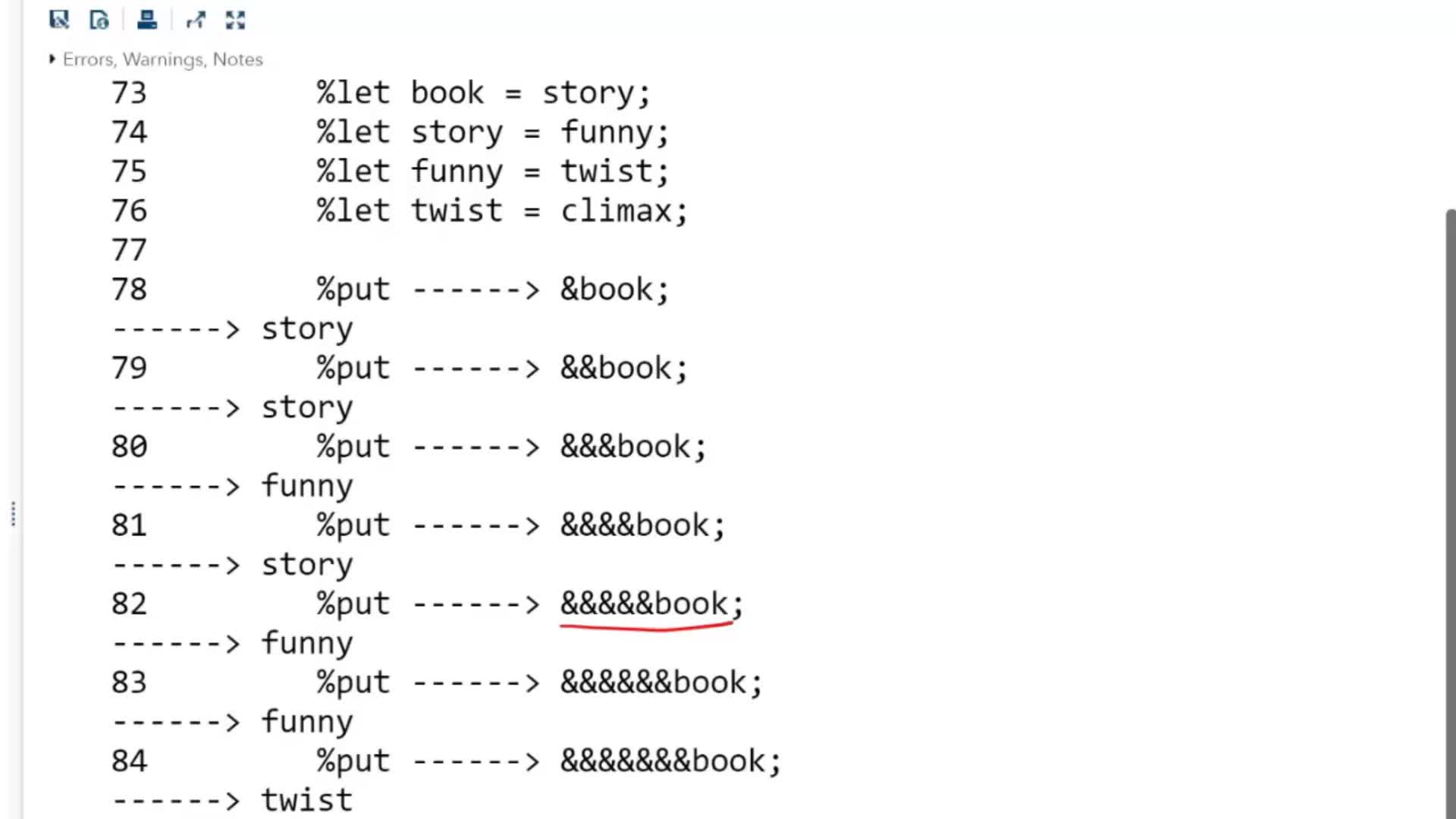
The Production Workhorse: Dynamic Loop Iteration (&&var&i) #
In real-world data engineering, nobody writes 15 ampersands. But you will write &&var&i almost every single week.
Suppose you have a list of clinical endpoints or financial accounts stored in indexed macro variables:
%let var1 = Heart_Rate;
%let var2 = Systolic_BP;
%let var3 = Diastolic_BP;

%macro generate_stats;
    %do i = 1 %to 3;
        proc means data=clinical_vitals mean std min max;
            var &&var&i;
            title "Summary Statistics for &&var&i";
        run;
    %end;
%mend generate_stats;
Why &var&i Fails (The Trainee Trap) #
If you write &var&i with only one ampersand before var, the Macro Processor scans left-to-right (Rule 1). It immediately tries to resolve &var. Because there is no macro variable named var in the symbol table, SAS writes a nasty warning in your log:
It then leaves var as literal text and resolves &i to 1, sending the invalid column name var1 to the procedure step.
Why &&var&i Works Flawlessly #
With two ampersands:
- Pass 1:
&&collapses into a single&(Rule 2). The wordvarhas no ampersand, so it staysvar. Then&ihas a single ampersand, so it resolves to its current loop number1. Output of Pass 1:&var1. - Pass 2: Because an ampersand remains, the scanner rescans (Rule 3).
&var1resolves to its stored value:Heart_Rate.
Viewing Resolutions Cleanly with %PUT and SYMBOLGEN #
When building nested automation in complex environments, don't guess what the scanner is doing. Turn on SAS's built-in auditing system:
options symbolgen mprint;

/* In the SAS Log, you will see the exact multi-pass trace: */
SYMBOLGEN:  && resolves to &.
SYMBOLGEN:  Macro variable I resolves to 1
SYMBOLGEN:  Macro variable VAR1 resolves to Heart_Rate
Combining OPTIONS SYMBOLGEN; with formatted %PUT statements (such as %put ------> &&var&i;) lets you inspect token resolution without polluting your production dataset log.
SAS Nested Macro Variables & Ampersand Resolution Guide #
Explore our encyclopedic Knowledge Hub guide with GEO direct answers, scanner pass rules, interactive FAQs, and structured JSON-LD educational schemas.
Lesson 6.03.02: More on Ampersand Resolutions #
Watch Aslam Khan demonstrate the funny book 15-ampersand resolution and live SAS Studio log execution in our interactive video masterclass player.